
Summary of Getting started with LCD's and Microprocessors using ATmega8
This article guides users on controlling a 16x2 LCD using an ATmega8 microcontroller and Bascom AVR software. It outlines the necessary hardware components for building the circuit on a breadboard and details the installation process for BASCOM AVR and PonyProg programming tools. A specific warning is provided regarding the use of resistors when powering the LCD backlight to prevent damage.
Parts used in the ATmega8 LCD Control Project:
- Breadboard
- Wires
- ATmega8
- Programmer
- Bascom AVR
- 10k resistor
- 100k resistor
- 10k variable resistor
- 7805 Voltage regulator
- 100 µF 16V electrolytic capacitor
- 100n capacitor
- 16x2 LCD
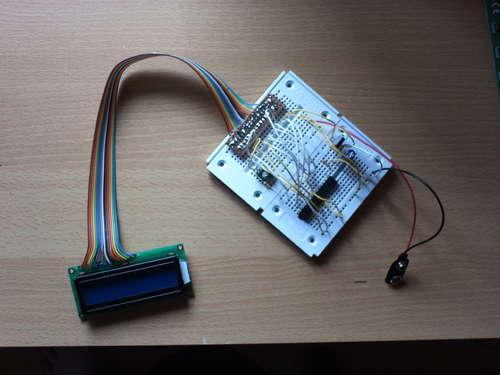
In this Instructable, find out how to control LCD’s with a ATmega8 and Bascom.
Demo
You will need:
– Breadboard
– Wires
– ATmega8
– Programmer
– Bascom AVR (There is also a demo version for Free)
– 10k resistor
– 100k resistor
– 10k variable resistor
– 7805 Voltage regulator
– 100 µF 16V electrolytic capacitor
– 100n capacitor
– 16×2 LCD
Step 1 Install Software
1) Go and download BASCOM AVR
http://www.mcselec.com/index.php?option=com_content&task=category§ionid=3&id=67&Itemid=41
2) Install it.
3) Download PonyProg
http://www.lancos.com/ppwin95.html
4) Install it
Step 2 Build the circuit
1) Build the circuit on your breadboard.
Warning:
When you want to use the backlight, make sure you’re using a resistor unless it’s already build in your LCD.
For more Detail: Getting started with LCD’s and Microprocessors using ATmega8
- What software is required to control the LCD with Bascom?
You must download and install BASCOM AVR along with PonyProg. - Can I use a free version of Bascom AVR?
Yes, there is a demo version available for free. - How do I handle the LCD backlight power supply?
You must use a resistor unless the backlight is already built into your LCD. - Where can I find detailed information about getting started with this project?
The article references a guide titled Getting started with LCD's and Microprocessors using ATmega8. - What type of voltage regulator is needed for this circuit?
A 7805 Voltage regulator is listed as a required component. - Which capacitors are specified for the build?
The project requires a 100 µF 16V electrolytic capacitor and a 100n capacitor. - Is a programmer included in the parts list?
Yes, a Programmer is listed as a necessary item alongside the ATmega8. - What display size is used in this demonstration?
A 16x2 LCD is used for the project.
