
Summary of Java AT Command Tester for GMS modems
AT Command Tester is a free Java-based online tool for testing GSM modems. It features a user-friendly interface to configure ports, send single or batch AT commands, run diagnostics, establish calls, and save logs. The tool supports script creation for tasks like SMS and HTTP access.
Parts used in the AT Command Tester:
- Java-based serial drivers
- Find Ports button
- Command Mode tab
- Script Mode tab
- Local machine storage for scripts
- GSM modem hardware
AT command tester is a free online software tool that is used to test AT commands and other functionalities of GSM modems. The friendly user interface allows developers to,
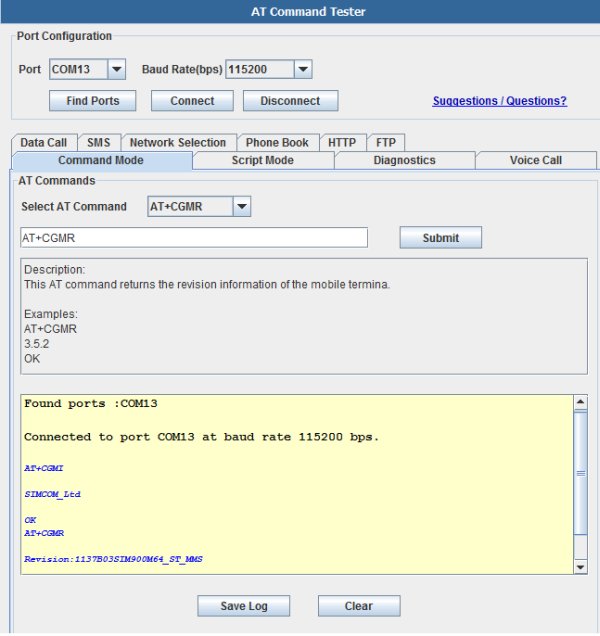
- Configure and connect to modem ports
- Send single or batch of AT commands
- Perform modem diagnostics
- Establish 3G or GPRS call
- Collect and save modem logs
Port Configuration
AT Command Tester uses Java-based serial drivers to interface to the modem. The ‘Find Ports’ button will automatically find all ports available in the system. The user can connect the appropriate modem port with the desired port speed.
Command mode
After connecting successfully to the modem, users can send single AT commands under ‘Command Mode’ tab. The drop down provides list provide list of AT commands with description and examples. The users can modify or enter their own AT command in the text box.Script Mode
Users can send batch of AT commands under the ‘Script Mode’ tab. They can also save and load the script from the local machine. Users can develop their own scripts for specific set of tasks such as call setup , send SMS, HTTP access etc. Users can also include descriptive comments in their script.
For more detail: Java AT Command Tester for GMS modems
-
What is AT Command Tester?
It is a free online software tool used to test AT commands and functionalities of GSM modems. -
How does the tool connect to the modem?
The tool uses Java-based serial drivers to interface with the modem and finds available ports automatically. -
Can users send batch commands?
Yes, users can send batches of AT commands under the Script Mode tab. -
What functions are supported by the user interface?
The interface allows configuring ports, sending commands, performing diagnostics, establishing calls, and saving logs. -
Is it possible to create custom scripts?
Users can develop their own scripts for specific tasks such as call setup, sending SMS, or HTTP access. -
Can descriptive comments be added to scripts?
Yes, users can include descriptive comments within their scripts.
