
Summary of Kitchen Timer using ATTiny2313 microcontroller
This article describes a DIY kitchen timer project driven by the author's dissatisfaction with existing commercial interfaces. The solution involves building a custom timer using an ATTiny2313 microcontroller. The interface features simple "down" and "Start/Add" buttons, allowing users to set countdown times by pressing the "down" button repeatedly for the desired minutes before initiating the count.
Parts used in the Kitchen Timer:
- ATTiny2313 microcontroller
- "Down" button
- "Start/Add" button
At the moment I do not have a kitchen timer. Not because I do not want one, (they’re cheap enough to buy) but because it seems impossible to buy a kitchen timer with a decent user interface.
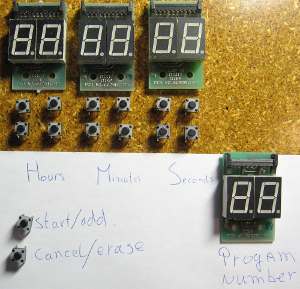
That means I have to build my own, which I just the kind of stuff I like. The user interface is probably going to look like the picture. Using this timer is extremely simple: If you need an count down time of for example 7 minutes then all you have to do is press the “down” button for the units of the minutes 3 times and then press “Start/Add” and the countdown will start.
For more detail: Kitchen Timer using ATTiny2313 microcontroller
- Why did the author build their own kitchen timer?
The author built it because they could not find a commercial timer with a decent user interface. - How do you set a 7-minute countdown on this device?
You press the down button three times for the units of minutes and then press Start/Add. - What microcontroller is used in this project?
The project uses an ATTiny2313 microcontroller. - Is this kitchen timer easy to use?
Yes, the article states that using this timer is extremely simple. - Can I buy a kitchen timer with a good user interface?
The author claims it seems impossible to buy one with a decent user interface at the moment. - What happens after pressing the Start/Add button?
The countdown will start immediately.
