
Summary of Simple calculator using avr microcontroller Atmega16
This article describes a simple calculator project using an Atmega16 microcontroller, a 16x2 LCD, and a 4x4 keypad. It provides Bascom code for reading keypad input, performing basic arithmetic (add, subtract, multiply, divide), and displaying results on the LCD. A Proteus simulation file is available for download.
Parts used in the Simple calculator using avr microcontroller atmega16:
- Atmega16 microcontroller
- 16x2 LCD display
- 4x4 keypad
- Crystal oscillator (1 MHz per code crystal setting)
- Resistors and pull-ups as needed for keypad and LCD (implicit)
- Power supply (Vcc/GND)
- Proteus simulation file (downloadable)
Here’s a simple calculator with the Atmega16 microcontroller. It have an LCD display and a 4×4 keypad.
You can also download the proteus simulation file on the downloads
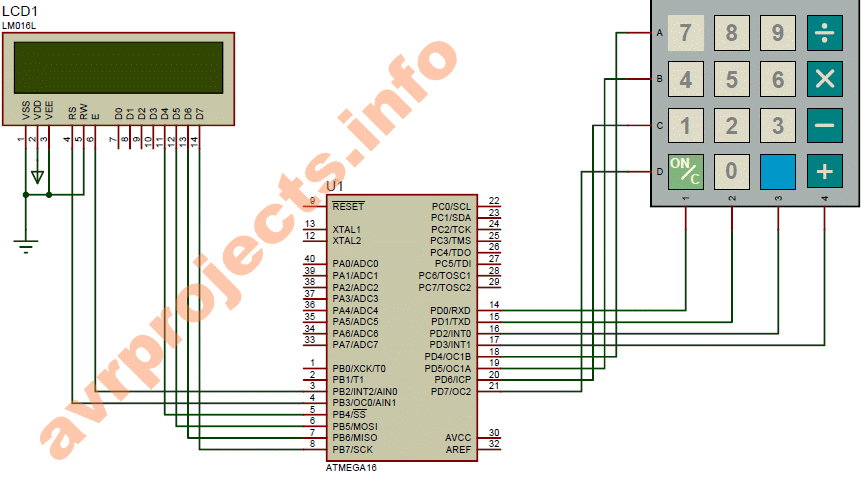
Bascom Code
$regfile = “m16def.dat”
$crystal = 1000000
Config Kbd = Portd , Debounce = 30
Config Lcd = 16 * 2
Config Lcdpin = Pin , Db4 = Portb.4 , Db5 = Portb.5 , Db6 = Portb.6 , Db7 = Portb.7 , Rs = Portb.3 , E = Portb.2
Dim A As Byte
Dim B As Byte
Dim Key As Byte
Dim C As Byte
Dim D As Byte
Dim E As Byte
Dim F As Byte
Cls
Cursor Off
Locate 2 , 1
Lcd “avrprojects.info”
E = 0
B = 0
Q:
Waitms 200
‘B = 0
A = Getkbd()
If A > 15 Then
Goto Q
Else
Key = Lookup(a , Dta)
If Key <= 9 Then
D = 0
B = 10 * B
B = B + Key
If E = 0 Then C = B
If E = 1 Then D = B
Cls : Lcd B
Elseif Key = 10 Then
Cls
F = 1
E = 1
B = 0
Elseif Key = 11 Then
Cls
E = 1
F = 2
B = 0
Elseif Key = 12 Then
Cls
E = 1
F = 3
B = 0
Elseif Key = 15 Then
Cls
E = 1
F = 4
B = 0
Elseif Key = 13 Then
Cls
E = 0
B = 0
Elseif Key = 14 Then
If E = 1 Then
Cls
Select Case F
Case 1 :
B = C / D
Case 2:
B = C * D
Case 3:
B = C – D
Case 4:
B = C + D
End Select
Lcd B
End If
End If
End If
Locate 2 , 1
Lcd “avrprojects.info”
Goto Q
End
Dta:
Data 7 , 8 , 9 , 10 , 4 , 5 , 6 , 11 , 1 , 2 , 3 , 12 , 13 , 0 , 14 , 15
For more Detail: Simple calculator using avr microcontroller atmega16
- What microcontroller is used in the project?
The project uses the Atmega16 microcontroller as shown by the Bascom regfile m16def.dat. - What display is used to show results?
A 16x2 LCD display is used and configured with Portb pins for DB4-DB7 and control pins Rs and E. - What input device is used for entering numbers and operations?
A 4x4 keypad is used and configured on Portd with debounce handling. - Which programming language or compiler is used for the code?
The code is written in Bascom-AVR, as indicated by Bascom directives and syntax. - What arithmetic operations does the calculator perform?
The calculator performs addition, subtraction, multiplication, and division based on keypad operation selection. - How are digits accumulated for multi-digit numbers?
Digits are accumulated by multiplying the current value B by 10 and adding the new key digit, storing results in C or D. - How is the equals operation handled?
When the equals key is pressed and E equals 1, the code selects the operation based on F and computes B = C / D, C * D, C - D, or C + D accordingly. - Is there a simulation file available?
Yes, a Proteus simulation file is available for download as mentioned in the article.
